HubSpot integrations / Documents and e-signature / Dropbox Sign
Dropbox Sign + HubSpot
ListedFacts verified 15 Nov 2026
Dropbox Sign's HubSpot app, built by Dropbox Sign, adds a card to contact, company and deal records for sending signature requests and tracking their status; signed documents are saved back to the record. It needs a paid Dropbox Sign plan, and requests sent outside HubSpot aren't tracked.
| HubSpot plan needed | Not stated |
|---|---|
| Regions | No regional restriction stated |
| Works with | 4 HubSpot objects |
| Price | Not reported |
| Setup | Not reported |
| AI agents | Not reported |
| Facts last verified | 15 Nov 2026 |
| Best for | Sales teams sending simple agreements for signature from HubSpot records |
| Not ideal for | Teams that bulk-send or need ticket-based signing from HubSpot |
What does Dropbox Sign sync with HubSpot?
| Fact | Direction | Source |
|---|---|---|
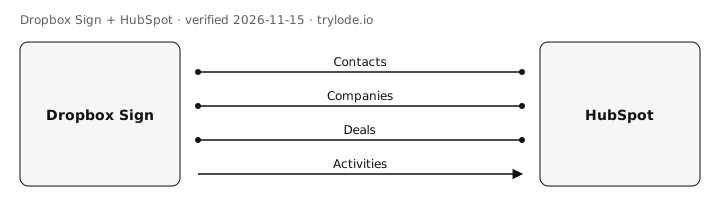
| Dropbox Sign works with HubSpot contacts. Signature requests (one-time document or template) are sent from the Dropbox Sign card on contact records, and signed documents are saved back to the record. Legacy template merge fields fill only when sent from a contact. | Direction not stated | [s1][s2][s3] |
| Dropbox Sign works with HubSpot companies. Requests can be sent from company records and are visible there whoever they go to; signed documents are saved back to the record. | Direction not stated | [s2][s3] |
| Dropbox Sign works with HubSpot deals. Requests can be sent from deal records and are visible there whoever they go to; signed documents are saved back to the record. | Direction not stated | [s2][s3] |
| Dropbox Sign sends signature request status to HubSpot. Status of outstanding requests appears in the contact's activity feed and in the CRM card, where reminders can be sent or requests cancelled. | Dropbox Sign → HubSpot | [s2][s3][s4] |
Compare other apps: Apps that sync contacts with HubSpot · Apps that sync activities with HubSpot · Apps that sync companies with HubSpot · Apps that sync deals with HubSpot
What does Dropbox Sign not do with HubSpot?
- Needs a paid Dropbox Sign plan (Essentials, Standard or Premium); free users must upgrade. moderate [s1][s3][s4]
- Only requests sent from the HubSpot card are tracked; requests sent from the Dropbox Sign web app don't appear in HubSpot, and the card shows only the 3 most recent requests. moderate [s2][s3]
- Bulk sending, attachment requests, template editing and sharing, template links and variable signing are only available in the Dropbox Sign web app. minor [s3]
- You must log in with the same email address in Dropbox Sign and HubSpot, and the browser must allow third-party cookies. minor [s1]
- New installs don't create HubSpot contacts for signers; requests sent from a contact record show only on the contact matching the recipient's email. minor [s2][s3]
- The card is documented on contact, company and deal records only; tickets are not mentioned. minor [s1][s2]
How much does Dropbox Sign cost?
- Dropbox Sign's Essentials plan costs A$22 a month, billed annually. [s5]
| Plan | Billing |
|---|---|
| Essentials Cheapest plan with the HubSpot integration | annual, per month billed yearly (AU$264 a year), 1 user; the page lists HubSpot among this plan's integrations and does not say whether GST is included |
What do you need to use Dropbox Sign with HubSpot?
- The sources don't limit Dropbox Sign to particular countries. [s1]
How do you set up Dropbox Sign with HubSpot?
Not reported. Lode has not yet verified setup steps for this integration. The vendor's own guide is at help.dropbox.com.
Is Dropbox Sign safe to connect to HubSpot?
Not reported. Lode has not yet verified connection-safety details for this integration. Vendors can add them free.
Can AI agents use Dropbox Sign?
Not reported. Lode has not yet verified whether AI agents can use Dropbox Sign.
How does Dropbox Sign compare?
Similar apps for HubSpot
See all 3 apps in Documents and e-signature for HubSpot
Sources
- Dropbox help: Install and authorise the HubSpot integration (vendor docs, retrieved 15 Nov 2026)
- Dropbox help: Dropbox Sign for HubSpot overview (vendor docs, retrieved 15 Nov 2026)
- Dropbox help: Dropbox Sign and HubSpot integration FAQs (vendor docs, retrieved 15 Nov 2026)
- HubSpot Marketplace: Dropbox Sign, fka HelloSign (marketplace listing, retrieved 15 Nov 2026)
- Dropbox Sign pricing, Australian page (read in Chrome) (vendor pricing, retrieved 15 Nov 2026)
Change log
- 15 Nov 2026: Record created from public sources
- 15 Nov 2026: Essentials price added from Dropbox Sign's pricing page, read in a browser
- 15 Nov 2026: Independent QA spot-check of sampled facts against the cited sources
Cite this page: Lode (trylode.io), "Dropbox Sign + HubSpot", facts verified 15 Nov 2026. https://trylode.io/hubspot/dropbox-sign/
Machine-readable: JSON. Spot an error? Send a correction.
Work at Dropbox Sign? Claim this page free to correct facts and add connection-safety details.
Machine-readable: JSON. Spot an error? Send a correction.
Work at Dropbox Sign? Claim this page free to correct facts and add connection-safety details.