HubSpot integrations / Collaboration / Microsoft Teams
Microsoft Teams + HubSpot
ListedFacts verified 15 Nov 2026
HubSpot's own Microsoft Teams app sends HubSpot notifications into Teams and logs Teams meetings, recordings and transcripts on HubSpot contacts. The core sync is available on all HubSpot plans, but recording sync needs a Teams Global Admin and extra Microsoft setup.
| HubSpot plan needed | Any plan |
|---|---|
| Regions | No regional restriction stated |
| Works with | 5 HubSpot objects |
| Price | From US$4 a month |
| Setup | Not reported |
| AI agents | Not reported |
| Facts last verified | 15 Nov 2026 |
| Best for | Microsoft 365 teams that want Teams meetings logged in HubSpot and HubSpot alerts in Teams |
| Not ideal for | Teams without a Microsoft admin able to approve the admin-level install |
What does Microsoft Teams sync with HubSpot?
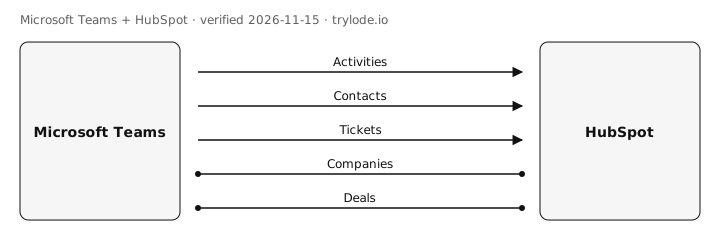
| Fact | Direction | Source |
|---|---|---|
| Microsoft Teams sends activities to HubSpot. Teams meetings, recordings, transcripts and summaries are synced to HubSpot meeting records and attendee contacts after the meeting ends. The sources describe data flowing from Teams to HubSpot only. Calls made with Teams Phone are logged to contact, primary company and deal records. | Microsoft Teams → HubSpot | [s1][s2] |
| Microsoft Teams sends contacts to HubSpot. Meeting participants are matched to existing contacts and new contacts are created for attendees not found, except users in the HubSpot account or excluded domains. | Microsoft Teams → HubSpot | [s2] |
| Microsoft Teams sends tickets to HubSpot. Tickets can be created from Teams (user-level install). Syncing help desk tickets needs Service Hub Professional or Enterprise; direction not stated. | Microsoft Teams → HubSpot | [s1] |
| Microsoft Teams works with HubSpot companies. Teams channels can be linked to company records; logged calls attach to the primary associated company. Not a record sync. | Direction not stated | [s1][s3] |
| Microsoft Teams works with HubSpot deals. Teams channels can be linked to deal records; logged calls attach to associated deals. Not a record sync. | Direction not stated | [s1][s3] |
Compare other apps: Apps that sync contacts with HubSpot · Apps that sync activities with HubSpot · Apps that sync companies with HubSpot · Apps that sync deals with HubSpot · Apps that sync tickets with HubSpot
What does Microsoft Teams not do with HubSpot?
- Meeting recording and transcript sync needs an admin-level install by a Microsoft Teams Global Admin, plus an application access policy set in PowerShell, Microsoft Graph access and speaker attribution turned on. Each meeting needs a calendar event. moderate [s1][s2]
- A user-level install covers only notifications, tasks and tickets, and meeting links. Other features need the admin-level install. moderate [s1]
- Only one Microsoft Teams instance can connect to a HubSpot account, and personal Microsoft Teams accounts cannot be connected. moderate [s1]
- Some features need a paid HubSpot tier: help desk ticket sync needs Service Hub Professional or Enterprise, and Conversation Intelligence on transcripts needs a Sales Hub or Service Hub Professional or Enterprise seat. HubSpot's listing adds workflow notifications and channel creation. moderate [s1][s2][s3]
- A Teams meeting link created in HubSpot cannot be updated; a new meeting is needed. minor [s1]
- The same Microsoft Teams account cannot be installed across different HubSpot data centers. minor [s1]
- HubSpot's articles do not name a required Microsoft plan beyond ruling out personal Teams accounts. Prices listed are Microsoft's business plans that include Teams; which of them work with the app is not stated. minor [s1][s4]
How much does Microsoft Teams cost?
- Microsoft Teams's Microsoft Teams Essentials plan costs US$4 a month, billed annually. [s4]
- Microsoft Teams's Microsoft 365 Business Basic plan costs US$7 a month, billed annually. [s4]
- Microsoft Teams's Microsoft 365 Business Standard with Copilot plan costs US$23.50 a month, billed annually. [s4]
| Plan | USD | Billing |
|---|---|---|
| Microsoft Teams Essentials | US$4 | annual, per user per month, paid yearly (annual subscription that auto-renews); no monthly-billing price shown; tax not stated |
| Microsoft 365 Business Basic | US$7 | annual, per user per month, paid yearly (annual subscription that auto-renews); no monthly-billing price shown; tax not stated |
| Microsoft 365 Business Standard with Copilot | US$23.50 | annual, per user per month, paid yearly (annual subscription that auto-renews); no monthly-billing price shown; tax not stated; usage-based billing may apply for some AI features |
What do you need to use Microsoft Teams with HubSpot?
- Microsoft Teams works on every HubSpot plan. [s1][s2]
- The sources don't limit Microsoft Teams to particular countries. [s1]
- Microsoft Teams is listed in the official HubSpot marketplace. [s3]
How do you set up Microsoft Teams with HubSpot?
Not reported. Lode has not yet verified setup steps for this integration. The vendor's own guide is at knowledge.hubspot.com.
Is Microsoft Teams safe to connect to HubSpot?
Not reported. Lode has not yet verified connection-safety details for this integration. Vendors can add them free.
Can AI agents use Microsoft Teams?
Not reported. Lode has not yet verified whether AI agents can use Microsoft Teams.
Where else does Microsoft integrate?
How does Microsoft Teams compare?
- Microsoft Teams vs Airtable for HubSpot
- Microsoft Teams vs Notion for HubSpot
- Microsoft Teams vs Slack for HubSpot
- Microsoft Teams vs Smartsheet for HubSpot
Similar apps for HubSpot
Listed alphabetically, not ranked.
See all 6 apps in Collaboration for HubSpot
Sources
- HubSpot Knowledge Base: Connect HubSpot and Microsoft Teams (platform docs, retrieved 15 Nov 2026)
- HubSpot Knowledge Base: Sync Microsoft Teams meeting recordings and transcripts to HubSpot (platform docs, retrieved 15 Nov 2026)
- HubSpot Marketplace: Microsoft Teams app listing (marketplace listing, retrieved 15 Nov 2026)
- Microsoft Teams: Compare Microsoft Teams business options (vendor pricing, retrieved 15 Nov 2026)
Change log
- 15 Nov 2026: Record created from public sources
- 15 Nov 2026: Independent QA check of every claim against the cited sources; overstated or unsupported claims corrected
- 15 Nov 2026: Plan prices added from the vendor's pricing page
Cite this page: Lode (trylode.io), "Microsoft Teams + HubSpot", facts verified 15 Nov 2026. https://trylode.io/hubspot/microsoft-teams/
Machine-readable: JSON. Spot an error? Send a correction.
Work at Microsoft? Claim this page free to correct facts and add connection-safety details.
Machine-readable: JSON. Spot an error? Send a correction.
Work at Microsoft? Claim this page free to correct facts and add connection-safety details.