QuickBooks Online integrations / Time tracking, Project management / BigTime
BigTime + QuickBooks Online
ListedFacts verified 15 Nov 2026
| QuickBooks Online plan needed | Not stated |
|---|---|
| Regions | No regional restriction stated |
| Syncs | 5 data types |
| Price | From US$20 a month |
| Setup | Not reported |
| AI agents | Not reported |
| Facts last verified | 15 Nov 2026 |
| Best for | Professional services firms tracking time and billing projects with QuickBooks Online |
What syncs between BigTime and QuickBooks Online?
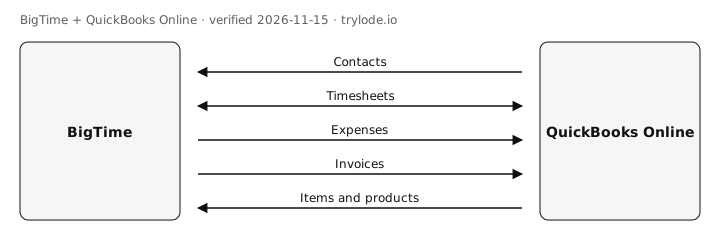
| Fact | Direction | Frequency | Detail | Source |
|---|---|---|---|---|
| BigTime pulls contacts from QuickBooks Online. Customers and the lowest level of jobs | QuickBooks Online → BigTime | Not documented | - | [s1][s2] |
| BigTime syncs timesheets with QuickBooks Online in both directions. Time and project data | Both ways | Not documented | - | [s3] |
| BigTime sends expenses to QuickBooks Online. | BigTime → QuickBooks Online | Not documented | - | [s1] |
| BigTime sends invoices to QuickBooks Online. Invoices built in BigTime are pushed to QuickBooks | BigTime → QuickBooks Online | Not documented | - | [s4] |
| BigTime pulls items and products from QuickBooks Online. Labor and expense codes | QuickBooks Online → BigTime | Not documented | - | [s4] |
Compare other apps: Apps that sync contacts with QuickBooks Online · Apps that sync invoices with QuickBooks Online · Apps that sync items and products with QuickBooks Online · Apps that sync expenses with QuickBooks Online · Apps that sync timesheets with QuickBooks Online
What does BigTime not do with QuickBooks Online?
- After the first sync, updates from QuickBooks Online are pulled manually from the dashboard. minor [s2]
- Setup must be done by a regular QuickBooks user, not an accountant user. minor [s2]
How much does BigTime cost?
- BigTime's Essentials plan costs US$20 a month. [s5]
| Plan | USD | Billing |
|---|---|---|
| Essentials | US$20 | monthly, starting price per user per month; includes QuickBooks |
What do you need to use BigTime with QuickBooks Online?
- The sources don't limit BigTime to particular countries. [s1]
How do you set up BigTime with QuickBooks Online?
Not reported. Lode has not yet verified setup steps for this integration. The vendor's own guide is at help.bigtime.net.
Is BigTime safe to connect to QuickBooks Online?
Not reported. Lode has not yet verified connection-safety details for this integration. Vendors can add them free.
Can AI agents use BigTime?
Not reported. Lode has not yet verified whether AI agents can use BigTime.
How does BigTime compare?
- BigTime vs Clockify for QuickBooks Online
- BigTime vs Harvest for QuickBooks Online
- BigTime vs Homebase for QuickBooks Online
- BigTime vs Procore for QuickBooks Online
- BigTime vs Toggl Track for QuickBooks Online
Similar apps for QuickBooks Online
- Connecteam + QuickBooks Online
- Deputy + QuickBooks Online
- Hubstaff + QuickBooks Online
- WorkflowMax + QuickBooks Online
Listed alphabetically, not ranked.
See all 8 apps in Time tracking apps for QuickBooks Online · See all 3 apps in Project management apps for QuickBooks Online
Sources
- BigTime help: QuickBooks Integration 101 (vendor docs, retrieved 14 Nov 2026)
- BigTime help: Connecting to QuickBooks Online (vendor docs, retrieved 14 Nov 2026)
- BigTime: QuickBooks time tracking integration (vendor docs, retrieved 14 Nov 2026)
- BigTime: QuickBooks integration (vendor docs, retrieved 14 Nov 2026)
- BigTime pricing (vendor pricing, retrieved 14 Nov 2026)
Change log
- 15 Nov 2026: Record created from public sources
Machine-readable: JSON. Spot an error? Send a correction.
Work at BigTime? Claim this page free to correct facts and add connection-safety details.