QuickBooks Online integrations / Payments, Automation / Chargebee
Chargebee + QuickBooks Online
ListedFacts verified 15 Nov 2026
| QuickBooks Online plan needed | Not stated |
|---|---|
| Regions | No regional restriction stated |
| Syncs | 7 data types |
| Price | Free plan, then usage fees |
| Setup | Not reported |
| AI agents | Not reported |
| Facts last verified | 15 Nov 2026 |
| Best for | Subscription businesses billing in Chargebee with QuickBooks Online as the ledger |
What syncs between Chargebee and QuickBooks Online?
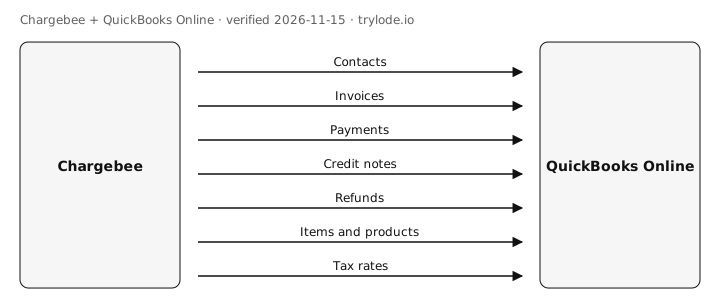
| Fact | Direction | Frequency | Detail | Source |
|---|---|---|---|---|
| Chargebee sends contacts to QuickBooks Online. Customers and addresses | Chargebee → QuickBooks Online | Not documented | - | [s1][s2] |
| Chargebee sends invoices to QuickBooks Online. | Chargebee → QuickBooks Online | Not documented | - | [s1][s2] |
| Chargebee sends payments to QuickBooks Online. | Chargebee → QuickBooks Online | Not documented | - | [s1] |
| Chargebee sends credit notes to QuickBooks Online. | Chargebee → QuickBooks Online | Not documented | - | [s1] |
| Chargebee sends refunds to QuickBooks Online. | Chargebee → QuickBooks Online | Not documented | - | [s1] |
| Chargebee sends items and products to QuickBooks Online. Plan and add-on price points | Chargebee → QuickBooks Online | Not documented | - | [s1] |
| Chargebee sends tax rates to QuickBooks Online. | Chargebee → QuickBooks Online | Not documented | - | [s1] |
Compare other apps: Apps that sync contacts with QuickBooks Online · Apps that sync invoices with QuickBooks Online · Apps that sync payments with QuickBooks Online · Apps that sync items and products with QuickBooks Online · Apps that sync tax rates with QuickBooks Online · Apps that sync credit notes with QuickBooks Online · Apps that sync refunds with QuickBooks Online
What does Chargebee not do with QuickBooks Online?
- One-way sync from Chargebee; edits made in QuickBooks are not sent back and can cause mapping issues. moderate [s2]
- QuickBooks sandbox accounts cannot be connected. minor [s1]
How much does Chargebee cost?
- Chargebee's Flow plan is free, then 0.80% of monthly invoicing volume below about $66k, then $99 plus 0.65%. [s3]
| Plan | USD | Billing |
|---|---|---|
| Flow | Free | monthly, 0.80% of monthly invoicing volume below about $66k, then $99 plus 0.65%, includes QuickBooks |
What do you need to use Chargebee with QuickBooks Online?
- The sources don't limit Chargebee to particular countries. [s1]
How do you set up Chargebee with QuickBooks Online?
Not reported. Lode has not yet verified setup steps for this integration. The vendor's own guide is at www.chargebee.com.
Is Chargebee safe to connect to QuickBooks Online?
Not reported. Lode has not yet verified connection-safety details for this integration. Vendors can add them free.
Can AI agents use Chargebee?
Not reported. Lode has not yet verified whether AI agents can use Chargebee.
Where else does Chargebee integrate?
Is Chargebee on other platforms?
How does Chargebee compare?
- Chargebee vs BILL for QuickBooks Online
- Chargebee vs Melio for QuickBooks Online
- Chargebee vs Webgility for QuickBooks Online
Similar apps for QuickBooks Online
- Airwallex + QuickBooks Online
- ApprovalMax + QuickBooks Online
- GoCardless + QuickBooks Online
- Ignition + QuickBooks Online
- Invoiced + QuickBooks Online
- Jotform + QuickBooks Online
Listed alphabetically, not ranked.
See all 16 apps in Payments apps for QuickBooks Online · See all 5 apps in Automation apps for QuickBooks Online
Sources
- Chargebee docs: QuickBooks Online (vendor docs, retrieved 14 Nov 2026)
- Chargebee docs: QuickBooks Online (sync overview) (vendor docs, retrieved 14 Nov 2026)
- Chargebee pricing (vendor pricing, retrieved 14 Nov 2026)
Change log
- 15 Nov 2026: Record created from public sources
Machine-readable: JSON. Spot an error? Send a correction.
Work at Chargebee? Claim this page free to correct facts and add connection-safety details.