QuickBooks Online integrations / Time tracking / Clockify
Clockify + QuickBooks Online
ListedFacts verified 15 Nov 2026
Clockify sends billable time entries to QuickBooks Online as time activities, creating projects from QuickBooks customers on the first sync. It needs Essentials or higher, a Clockify Standard plan, and payroll turned off. Standard is $6.99 per seat a month.
| QuickBooks Online plan needed | Essentials or higher |
|---|---|
| Regions | No regional restriction stated |
| Syncs | 3 data types |
| Price | From US$6.99 a month |
| Setup | Not reported |
| AI agents | Not reported |
| Facts last verified | 15 Nov 2026 |
| Best for | Teams tracking billable hours in Clockify and invoicing from QuickBooks Online |
What syncs between Clockify and QuickBooks Online?
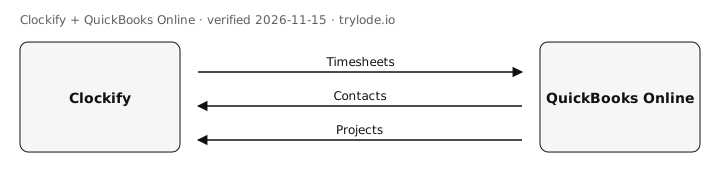
| Fact | Direction | Frequency | Detail | Source |
|---|---|---|---|---|
| Clockify sends timesheets to QuickBooks Online. Billable time entries are sent as time activities; sent entries are locked | Clockify → QuickBooks Online | Not documented | - | [s1][s2] |
| Clockify pulls contacts from QuickBooks Online. QuickBooks customers become Clockify projects on the first sync | QuickBooks Online → Clockify | Not documented | - | [s2] |
| Clockify pulls projects from QuickBooks Online. Customers and sub-customers map to Clockify clients and projects | QuickBooks Online → Clockify | Not documented | - | [s2] |
Compare other apps: Apps that sync contacts with QuickBooks Online · Apps that sync timesheets with QuickBooks Online
What does Clockify not do with QuickBooks Online?
- Does not work with QuickBooks Online Simple Start or Desktop. moderate [s1]
- Does not work when QuickBooks payroll is turned on; a separate payroll add-on is needed. moderate [s1]
- Only billable time entries sync, and tasks do not sync. minor [s2][s4]
How much does Clockify cost?
- Clockify's Standard plan costs US$6.99 a month. [s3]
| Plan | USD | Billing |
|---|---|---|
| Standard | US$6.99 | monthly, per seat per month ($5.49 billed annually); includes the QuickBooks integration |
What do you need to use Clockify with QuickBooks Online?
- Clockify needs the QuickBooks Online Essentials plan or higher. [s1]
- The sources don't limit Clockify to particular countries. [s1]
How do you set up Clockify with QuickBooks Online?
Not reported. Lode has not yet verified setup steps for this integration. The vendor's own guide is at clockify.me.
Is Clockify safe to connect to QuickBooks Online?
Not reported. Lode has not yet verified connection-safety details for this integration. Vendors can add them free.
Can AI agents use Clockify?
Not reported. Lode has not yet verified whether AI agents can use Clockify.
Where else does CAKE.com integrate?
Is Clockify on other platforms?
How does Clockify compare?
- Clockify vs BigTime for QuickBooks Online
- Clockify vs Deputy for QuickBooks Online
- Clockify vs Harvest for QuickBooks Online
- Clockify vs Homebase for QuickBooks Online
- Clockify vs Hubstaff for QuickBooks Online
- Clockify vs Toggl Track for QuickBooks Online
Similar apps for QuickBooks Online
Listed alphabetically, not ranked.
See all 8 apps in Time tracking apps for QuickBooks Online
Sources
- Clockify help: QuickBooks integration (vendor docs, retrieved 14 Nov 2026)
- Clockify help: QuickBooks Clockify integration (vendor docs, retrieved 14 Nov 2026)
- Clockify pricing (vendor pricing, retrieved 14 Nov 2026)
- Clockify help: QuickBooks integration (send time) (vendor docs, retrieved 14 Nov 2026)
Change log
- 15 Nov 2026: Record created from public sources
Cite this page: Lode (trylode.io), "Clockify + QuickBooks Online", facts verified 15 Nov 2026. https://trylode.io/quickbooks-online/clockify/
Machine-readable: JSON. Spot an error? Send a correction.
Work at CAKE.com? Claim this page free to correct facts and add connection-safety details.
Machine-readable: JSON. Spot an error? Send a correction.
Work at CAKE.com? Claim this page free to correct facts and add connection-safety details.