HubSpot integrations / Project management / ClickUp
ClickUp + HubSpot
ListedFacts verified 15 Nov 2026
ClickUp's HubSpot integration runs on automations: HubSpot deal, contact, company and ticket events can create or update ClickUp tasks, and ClickUp triggers can create or update HubSpot records. No ongoing record sync is described. HubSpot's deal workflows need Professional or above.
| HubSpot plan needed | Not stated |
|---|---|
| Regions | No regional restriction stated |
| Works with | 5 HubSpot objects |
| Price | Free |
| Setup | Not reported |
| AI agents | Not reported |
| Facts last verified | 15 Nov 2026 |
| Best for | Teams that want new or changed HubSpot deals to open ClickUp tasks automatically |
| Not ideal for | Teams needing custom fields passed from HubSpot workflows; Teams wanting a continuous record sync between ClickUp and HubSpot |
What does ClickUp sync with HubSpot?
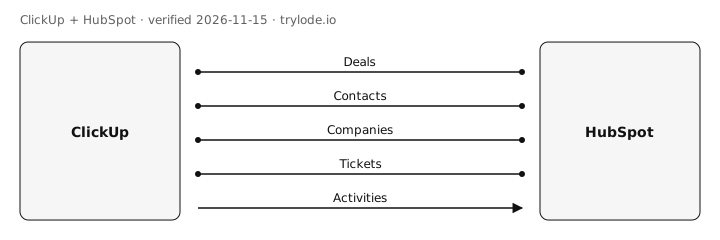
| Fact | Direction | Source |
|---|---|---|
| ClickUp works with HubSpot deals. ClickUp Automations can create tasks or subtasks when a HubSpot deal is created, update linked tasks when deal properties change, and create deals or update deal properties from ClickUp triggers. HubSpot deal workflows can also create ClickUp tasks (no custom fields sent). Trigger-based automations, not a described record sync. | Direction not stated | [s1][s2] |
| ClickUp works with HubSpot contacts. ClickUp Automations offer a contact property change trigger, and create contact and update contact actions in HubSpot. Trigger-based automations, not a described record sync. | Direction not stated | [s1][s2] |
| ClickUp works with HubSpot companies. ClickUp Automations offer a company property change trigger, and create company and update company actions in HubSpot. Trigger-based automations, not a described record sync. | Direction not stated | [s1][s2] |
| ClickUp works with HubSpot tickets. ClickUp Automations offer a ticket property change trigger, and create ticket and update ticket actions in HubSpot. Trigger-based automations, not a described record sync. | Direction not stated | [s1][s2] |
| ClickUp sends hubSpot tasks to HubSpot. ClickUp Automations include a create task action in HubSpot. Products and line items can also be created or updated, and product property changes can trigger automations. | ClickUp → HubSpot | [s1] |
Compare other apps: Apps that sync contacts with HubSpot · Apps that sync activities with HubSpot · Apps that sync companies with HubSpot · Apps that sync deals with HubSpot · Apps that sync tickets with HubSpot
What does ClickUp not do with HubSpot?
- Built on automations: actions run when a trigger fires in HubSpot or ClickUp. Neither ClickUp's article nor the listing describes an ongoing sync of tasks with HubSpot records, and the listing gives no sync direction. moderate [s1][s2]
- Custom field mapping is not supported for HubSpot workflows, which send no custom fields. In Automations, HubSpot fields map only to matching ClickUp Custom Fields that must be created first. moderate [s1]
- The HubSpot workflow side (creating ClickUp tasks from deal workflows) needs HubSpot Professional or above. ClickUp's article does not state a HubSpot plan for ClickUp Automations. moderate [s1]
- Records created from HubSpot Automations do not trigger other HubSpot Automations, so chained automations will not fire. minor [s1]
- Only a Workspace owner or admin can authenticate HubSpot. Pasting a HubSpot URL into a comment lists it in Relationships but does not link the records. minor [s1]
- Paid ClickUp prices are not recorded because the pricing page could not be read. ClickUp says price updates begin no earlier than January 2027 for some Workspaces, and some features have plan-based usage limits. moderate [s3][s4]
How much does ClickUp cost?
- ClickUp's Free Forever plan is free. [s3]
| Plan | USD | Billing |
|---|---|---|
| Free Forever | Free | monthly, default plan for new Workspaces. Paid plan prices (Unlimited, Business, Business Plus, Enterprise) are not recorded: ClickUp's pricing page could not be read and its help articles give no prices |
What do you need to use ClickUp with HubSpot?
- The sources don't limit ClickUp to particular countries. [s1]
How do you set up ClickUp with HubSpot?
Not reported. Lode has not yet verified setup steps for this integration. The vendor's own guide is at help.clickup.com.
Is ClickUp safe to connect to HubSpot?
Not reported. Lode has not yet verified connection-safety details for this integration. Vendors can add them free.
Can AI agents use ClickUp?
Not reported. Lode has not yet verified whether AI agents can use ClickUp.
How does ClickUp compare?
- ClickUp vs Airtable for HubSpot
- ClickUp vs Asana for HubSpot
- ClickUp vs Jira for HubSpot
- ClickUp vs monday.com for HubSpot
- ClickUp vs Smartsheet for HubSpot
- ClickUp vs Trello for HubSpot
Similar apps for HubSpot
See all 6 apps in Project management for HubSpot
Sources
- ClickUp help: HubSpot integration (vendor docs, retrieved 15 Nov 2026)
- HubSpot Marketplace: ClickUp (marketplace listing, retrieved 15 Nov 2026)
- ClickUp help: Intro to pricing (vendor docs, retrieved 15 Nov 2026)
- ClickUp help: New plans and pricing options (vendor docs, retrieved 15 Nov 2026)
Change log
- 15 Nov 2026: Record created from public sources
- 15 Nov 2026: Independent QA spot-check of sampled facts against the cited sources; wording corrected
Cite this page: Lode (trylode.io), "ClickUp + HubSpot", facts verified 15 Nov 2026. https://trylode.io/hubspot/clickup/
Machine-readable: JSON. Spot an error? Send a correction.
Work at ClickUp? Claim this page free to correct facts and add connection-safety details.
Machine-readable: JSON. Spot an error? Send a correction.
Work at ClickUp? Claim this page free to correct facts and add connection-safety details.