QuickBooks Online integrations / Payments, Reporting and analytics / Synder
Synder + QuickBooks Online
ListedFacts verified 15 Nov 2026
| QuickBooks Online plan needed | Not stated |
|---|---|
| Regions | No regional restriction stated |
| Syncs | 5 data types |
| Price | From US$52 a month |
| Setup | Not reported |
| AI agents | Not reported |
| Facts last verified | 15 Nov 2026 |
| Best for | Ecommerce and SaaS businesses taking payments on several platforms |
What syncs between Synder and QuickBooks Online?
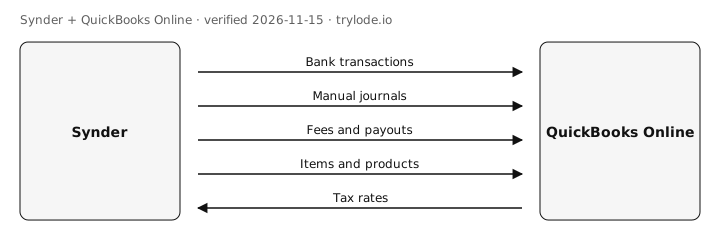
| Fact | Direction | Frequency | Detail | Source |
|---|---|---|---|---|
| Synder sends bank transactions to QuickBooks Online. Per-transaction mode posts each sale, refund and payout through a clearing account for the payment platform | Synder → QuickBooks Online | Not documented | - | [s2] |
| Synder sends manual journals to QuickBooks Online. Summary Sync posts one aggregated entry per period | Synder → QuickBooks Online | Not documented | - | [s4] |
| Synder sends fees and payouts to QuickBooks Online. Processing fees as expenses to a chosen account | Synder → QuickBooks Online | Not documented | - | [s3] |
| Synder sends items and products to QuickBooks Online. Platform products mapped to items (per-transaction mode) | Synder → QuickBooks Online | Not documented | - | [s3] |
| Synder pulls tax rates from QuickBooks Online. | QuickBooks Online → Synder | Not documented | - | [s3] |
Compare other apps: Apps that sync items and products with QuickBooks Online · Apps that sync tax rates with QuickBooks Online · Apps that sync manual journals with QuickBooks Online · Apps that sync bank transactions with QuickBooks Online · Apps that sync fees and payouts with QuickBooks Online
What does Synder not do with QuickBooks Online?
- Auto-sync is only on paid plans; trial users sync manually. minor [s3]
- Switching between per-transaction and Summary Sync means creating a new Synder organisation. minor [s4]
How much does Synder cost?
- Synder's Basic plan costs US$52 a month, billed annually. [s5]
- Synder's Essential plan costs US$103 a month, billed annually. [s5]
- Synder's Pro plan costs US$240 a month, billed annually. [s5]
- Synder's Pro Max plan costs US$480 a month, billed annually. [s5]
| Plan | USD | Billing |
|---|---|---|
| Basic | US$52 | annual, per month billed annually; 500 synced transactions a month |
| Essential | US$103 | annual, from per month billed annually; 1,000 synced transactions a month |
| Pro | US$240 | annual, from per month billed annually; 10,000 synced transactions a month |
| Pro Max | US$480 | annual, from per month billed annually; 20,000 synced transactions a month |
What do you need to use Synder with QuickBooks Online?
- The sources don't limit Synder to particular countries. [s1]
How do you set up Synder with QuickBooks Online?
Not reported. Lode has not yet verified setup steps for this integration. The vendor's own guide is at synder.com.
Is Synder safe to connect to QuickBooks Online?
Not reported. Lode has not yet verified connection-safety details for this integration. Vendors can add them free.
Can AI agents use Synder?
Not reported. Lode has not yet verified whether AI agents can use Synder.
Where else does Synder integrate?
Is Synder on other platforms?
How does Synder compare?
- Synder vs Maxio for QuickBooks Online
- Synder vs PayPal for QuickBooks Online
- Synder vs Webgility for QuickBooks Online
Similar apps for QuickBooks Online
- Airwallex + QuickBooks Online
- BILL + QuickBooks Online
- Calxa + QuickBooks Online
- Chargebee + QuickBooks Online
- Fathom + QuickBooks Online
- GoCardless + QuickBooks Online
Listed alphabetically, not ranked.
See all 16 apps in Payments apps for QuickBooks Online · See all 6 apps in Reporting and analytics apps for QuickBooks Online
Sources
- Synder: QuickBooks Online integration (vendor docs, retrieved 15 Nov 2026)
- Synder help: Per-Transaction Sync user guide (vendor docs, retrieved 15 Nov 2026)
- Synder help: Setup in the first 30 minutes (vendor docs, retrieved 15 Nov 2026)
- Synder help: How to start using Summary Sync (vendor docs, retrieved 15 Nov 2026)
- Synder pricing (vendor pricing, retrieved 15 Nov 2026)
Change log
- 15 Nov 2026: Record created from public sources
Machine-readable: JSON. Spot an error? Send a correction.
Work at Synder? Claim this page free to correct facts and add connection-safety details.