QuickBooks Online integrations / Expenses / Expensify
Expensify + QuickBooks Online
ListedFacts verified 15 Nov 2026
| QuickBooks Online plan needed | Not stated |
|---|---|
| Regions | No regional restriction stated |
| Syncs | 8 data types |
| Price | From US$5 a month |
| Setup | Not reported |
| AI agents | Not reported |
| Facts last verified | 15 Nov 2026 |
| Best for | Teams that submit and approve expenses before they reach QuickBooks Online |
What syncs between Expensify and QuickBooks Online?
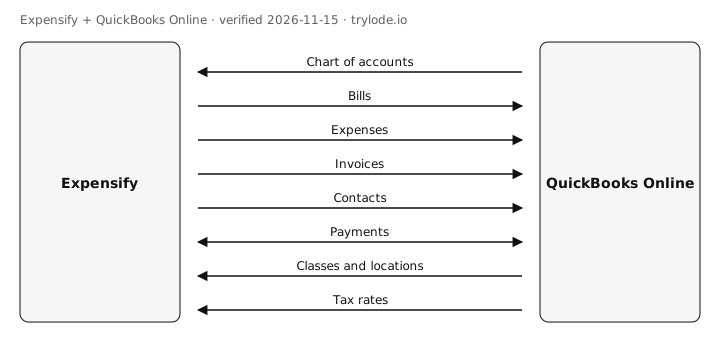
| Fact | Direction | Frequency | Detail | Source |
|---|---|---|---|---|
| Expensify pulls chart of accounts from QuickBooks Online. Expense accounts are imported as categories | QuickBooks Online → Expensify | Not documented | - | [s2] |
| Expensify sends bills to QuickBooks Online. Reimbursable reports export as vendor bills, checks or journal entries | Expensify → QuickBooks Online | Not documented | - | [s1] |
| Expensify sends expenses to QuickBooks Online. Company card expenses export as credit card or debit card expenses, or vendor bills | Expensify → QuickBooks Online | Not documented | - | [s1] |
| Expensify sends invoices to QuickBooks Online. | Expensify → QuickBooks Online | Not documented | - | [s1] |
| Expensify sends contacts to QuickBooks Online. Vendors and customers are created if missing | Expensify → QuickBooks Online | Not documented | - | [s1] |
| Expensify syncs payments with QuickBooks Online in both directions. Reports reimbursed by ACH are marked paid in QuickBooks, and bills paid in QuickBooks mark reports reimbursed | Both ways | Not documented | - | [s1] |
| Expensify pulls classes and locations from QuickBooks Online. Classes, customers, projects and locations | QuickBooks Online → Expensify | Not documented | - | [s2] |
| Expensify pulls tax rates from QuickBooks Online. | QuickBooks Online → Expensify | Not documented | - | [s2] |
Compare other apps: Apps that sync contacts with QuickBooks Online · Apps that sync invoices with QuickBooks Online · Apps that sync payments with QuickBooks Online · Apps that sync bills with QuickBooks Online · Apps that sync chart of accounts with QuickBooks Online · Apps that sync classes and locations with QuickBooks Online · Apps that sync tax rates with QuickBooks Online · Apps that sync expenses with QuickBooks Online
What does Expensify not do with QuickBooks Online?
- QuickBooks does not apply exchange rates on export, so foreign-currency bills need manual adjustment. minor [s1]
- Only newly approved reports export automatically; older reports must be exported by hand. minor [s1]
How much does Expensify cost?
| Plan | USD | Billing |
|---|---|---|
| Collect | US$5 | monthly, per unique member per month, pay-per-use |
| Control | US$18 | monthly, per member per month on an annual subscription; $36 per active member pay-per-use |
What do you need to use Expensify with QuickBooks Online?
- The sources don't limit Expensify to particular countries. [s1]
How do you set up Expensify with QuickBooks Online?
Not reported. Lode has not yet verified setup steps for this integration. The vendor's own guide is at help.expensify.com.
Is Expensify safe to connect to QuickBooks Online?
Not reported. Lode has not yet verified connection-safety details for this integration. Vendors can add them free.
Can AI agents use Expensify?
Not reported. Lode has not yet verified whether AI agents can use Expensify.
Where else does Expensify integrate?
Is Expensify on other platforms?
How does Expensify compare?
- Expensify vs Brex for QuickBooks Online
- Expensify vs Precoro for QuickBooks Online
- Expensify vs Procurify for QuickBooks Online
Similar apps for QuickBooks Online
- Airwallex + QuickBooks Online
- Dext + QuickBooks Online
- Ramp + QuickBooks Online
- Spendesk + QuickBooks Online
Listed alphabetically, not ranked.
See all 8 apps in Expenses apps for QuickBooks Online
Sources
- Expensify help: Configure QuickBooks Online (vendor docs, retrieved 14 Nov 2026)
- Expensify help: Set up QuickBooks Online connection (vendor docs, retrieved 14 Nov 2026)
- Expensify pricing (vendor pricing, retrieved 14 Nov 2026)
Change log
- 15 Nov 2026: Record created from public sources
Machine-readable: JSON. Spot an error? Send a correction.
Work at Expensify? Claim this page free to correct facts and add connection-safety details.